




Two hours into the investigation, everything checks out: machine is running, power supply is intact, install looks correct. The device comes back online when the equipment pulls out of the parking structure it has been working in all morning. The flag was real. The problem was not.
For fleet managers, this is one of the most common and expensive misreads in telematics: treating an expected no-signal condition as a device fault worth chasing. Device Health is built so you do not have to find out the hard way.
The alert comes through: a device is showing as offline. You assign someone to look at it. They check the machine, check the power supply, check the install. Everything looks correct. Two hours later you find out the machine has been operating inside a parking structure with no cellular signal, and it came back online when it drove out that morning.
That investigation consumed time that could have gone somewhere else. It will happen again next week unless you can tell, before you dispatch anyone, whether the flag represents a real fault or an expected condition.
The distinction between a device that is genuinely offline and one that is simply unreachable in its current environment is one of the most operationally significant calls a fleet manager makes. Get it wrong in either direction and there is a cost: chase a non-problem and you waste resources. Miss a real fault and the data gap grows. Device Health is built to give you the information that makes this call before you have to make it.

Coverage issues in Device Health fall into two categories, each with a different cause and a different resolution path.
The first is cellular coverage. A device without cellular signal cannot transmit data to the platform. This is an environmental condition, not a device fault. A machine operating underground, in a remote area without network coverage, or in a building that blocks cellular transmission will show a coverage issue for as long as it is in that environment. When the machine moves to a covered area, the issue typically clears on its own.
The second is GPS signal quality. A device can maintain a cellular connection and still report degraded location accuracy. Poor GPS signal quality affects how reliably a device can transmit its position. Unlike a cellular gap, which is primarily about whether data reaches the platform at all, a GPS quality issue affects the accuracy of the location data that does come through. The two conditions can co-exist, but they represent different problems and call for different responses.
Both appear in Device Health as a distinct category, separated from non-reporting devices and from battery or installation issues. Knowing which type of coverage issue you are looking at is the first filter that determines what, if anything, you should do next.

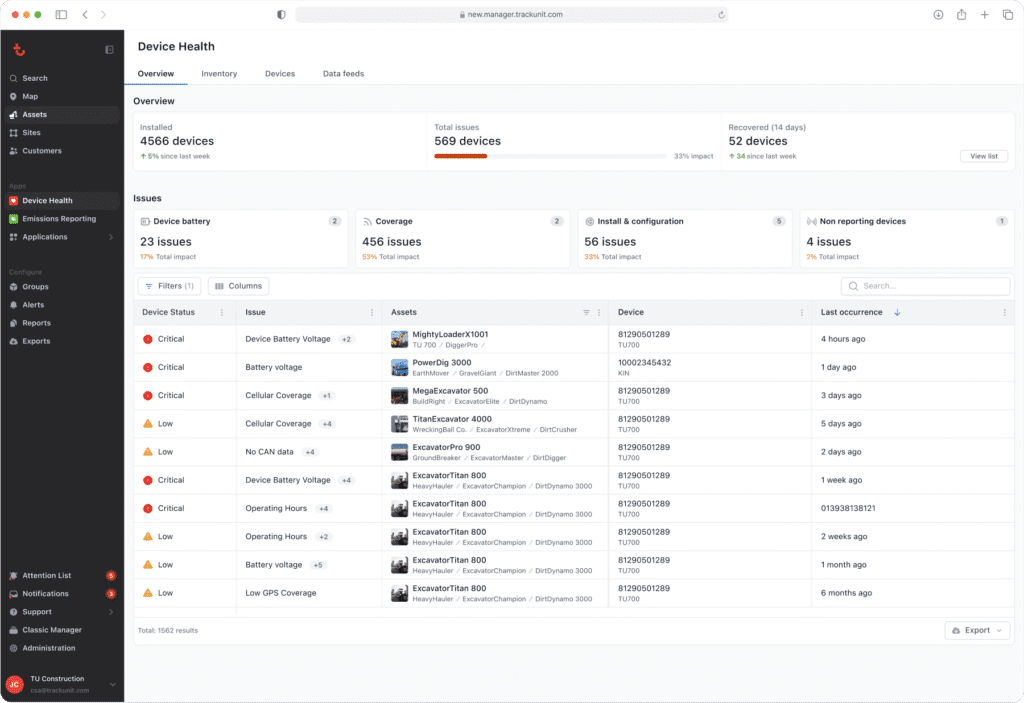
For each device flagged with a coverage issue, Device Health shows the type of issue (cellular or GPS) alongside a severity indicator and the duration of the condition. The side panel for each affected asset provides the context that helps you assess whether you are looking at an expected condition or something worth investigating.
Duration matters. A machine showing no cellular coverage for six hours on a job site in a rural area is a different flag from a machine that has been showing a cellular gap for eleven days without moving. Device Health shows both, and the information alongside each flag is what makes the difference between a useful signal and noise.
The history tab for each device shows previous coverage events and when they resolved. If a machine has shown the same coverage gap repeatedly at the same location over several weeks, that pattern is visible. It may indicate a known environmental condition that does not require action, or it may indicate an installation problem that has been generating intermittent flags without ever being identified as the root cause.
Filtering by location, home depot, rental status, or asset group lets you segment coverage issues by context. A device flagged while on rent on a known low-coverage job site is a different conversation from one sitting at a depot in a fully covered area.
1. Check how long the coverage gap has been present: Duration is the first filter. Device Health surfaces this alongside every coverage issue. A machine offline for two hours on an active job site is a different flag from one showing a cellular gap for eleven days with no movement.
2. Check the machine’s location and context: Device Health’s filters let you segment by home depot, rental status, or asset group. A device flagged at a covered depot yard warrants attention. One on a known low-signal job site probably does not.
3. Review the history tab for the device: Repeated gaps that resolve when the machine moves point to an environmental condition. A gap that has persisted regardless of where the machine is suggests a device or installation fault.
4. Cross-reference service and install records: A GPS quality issue that appeared after a scheduled service visit is a strong indicator of an antenna or configuration problem introduced at that visit.
5. Ask whether the issue is resolving on its own: Environmental coverage gaps clear when the machine moves to a covered area. If the gap has been present across multiple locations or for an extended period, that persistence is the signal something needs to be physically checked.
Coverage gaps affect location data and real-time reporting accuracy. For IrisX Blueprints that depend on accurate asset location, including Smart Servicing scheduling, Out-of-Contract Usage detection, and utilization analytics tied to specific job sites, the quality of that location data starts with whether devices are connecting and transmitting reliably.
A fleet with unresolved cellular gaps has assets that go dark when they move into low-coverage environments. A fleet with GPS quality issues has assets whose location data cannot be fully trusted. Device Health makes both visible, distinguishes expected conditions from genuine faults, and gives you the tools to address the ones that matter.
When coverage is clean across your fleet, IrisX has what it needs to do what it is designed to do. Device Health is how you get there.
To get started, visit the Device Health getting started guide in the Trackunit Help Center.
What is the difference between a cellular coverage gap and a GPS coverage issue in Device Health?
The difference between a cellular coverage gap and a GPS coverage issue in Device Health is what each condition affects. A cellular coverage gap means a device cannot transmit data to the platform because there is no network signal in its current environment. A GPS coverage issue means the device has a degraded GPS signal that affects the accuracy of location data, but data transmission may still continue. Both appear in Device Health as coverage issues and have different causes and resolution paths.
How does Device Health help me tell the difference between an expected offline condition and a real fault?
Device Health helps you tell the difference between an expected offline condition and a real fault by showing the duration of the coverage issue, its type, and a severity indicator for each affected device. The history tab shows previous coverage events for that device, so you can see whether a flag reflects a recurring environmental pattern or something that warrants investigation. Duration and location context are what separate a flag worth acting on from one worth noting.
Can a GPS issue be caused by a problem with the installation rather than the environment?
Yes, a GPS issue can be caused by a problem with the installation rather than the environment. A damaged or improperly positioned GPS antenna can cause persistent signal quality issues that look similar to environmental interference. Device Health surfaces the issue and its duration. A GPS quality problem that does not resolve as the machine moves across different locations is a strong indicator of an installation fault and a candidate for an install review.
Jon Harder is Senior Product Manager at Trackunit, a global SaaS company that connects construction equipment through IoT technology to deliver data-driven insights across the world’s largest construction fleets. He owns the product vision and roadmap for fleet connectivity at Trackunit, including Device Health, the company’s fleet-wide telematics diagnostic product launched in June 2026.