





Every connected fleet relies on one simple truth. You can only manage what you can see.
Yet for years, even well installed telematics devices often delivered incomplete value. Not because the hardware failed, but because something more basic was missing. Metadata.
When a machine’s brand, model, engine type, and engine hours are not captured during installation, the device produces data without identity. The system knows something is connected, but not what it represents. It is the digital equivalent of hearing a voice in a crowd without knowing who is speaking.
That missing context limits reporting, utilization tracking, and the insights teams depend on to keep fleets running efficiently.
The Trackunit Fit mobile app was designed to close this gap by making metadata capture a standard part of installation validation, not an optional step that can be skipped under pressure.
What is metadata in telematics installations?
Metadata is structured asset information—such as machine make, model, serial number, and operating hours—captured during installation to link device signals to the correct machine. It gives raw telematics data identity, context, and reporting value.
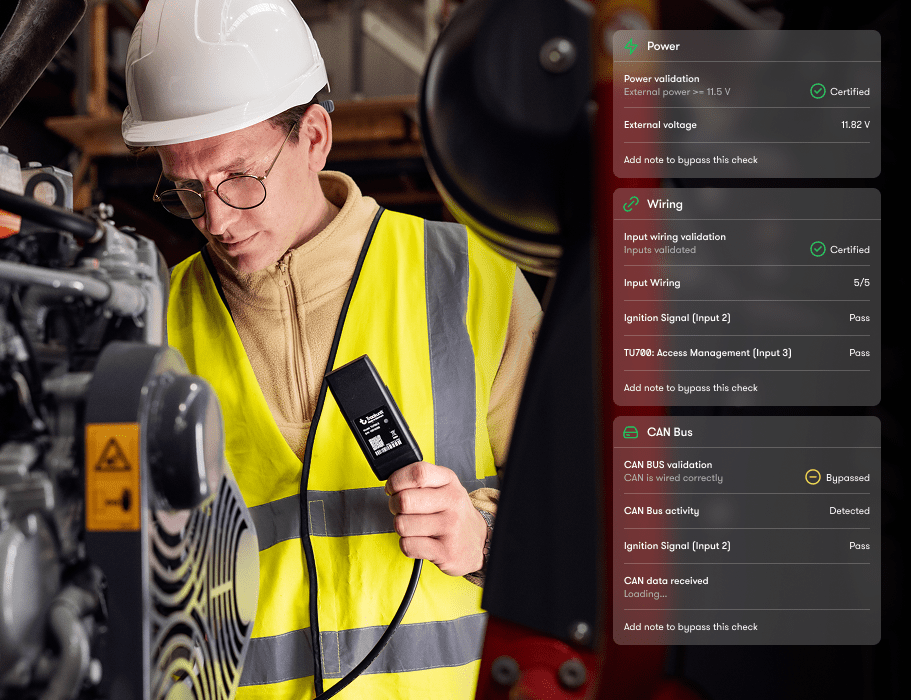
Metadata is the structured information that gives telematics data meaning. It links raw signals to a real machine and provides the context needed to understand how that machine is being used.
Without metadata, even accurate CAN signals have limited value. Fleet managers may see activity, but they cannot confidently analyze utilization, compare performance across asset types, or identify patterns that support maintenance and uptime decisions.
Historically, metadata capture was often treated as a back office task. Installers focused on physical setup, powering the device, and confirming connectivity. Optional data entry steps were left for later, and later often never came.
That was not a failure of people. It was a limitation of the tools available at the time.
What is metadata in telematics installations?
Metadata is the structured information, such as machine make, model, serial number, and operating hours, that gives telematics data context and makes it meaningful for reporting and analysis.
Why is metadata important for connected fleets?
Metadata connects device data to the correct machine. Without it, you cannot trust utilization metrics, performance analysis, or fleet-level reporting.
Earlier installation processes reflected real constraints in the field. Teams needed to move quickly, machines needed to return to work, and tools did not always make it easy to capture complete information during install.
As a result, fleets ended up with a mix of connected devices. Some were fully described and useful. Others were online but difficult to trust. Operations teams spent hours correcting records, reconciling device serial numbers, and trying to understand which machine was actually reporting data.
Customer feedback made it clear that this was the missing link. They did not need more training or stricter processes. They needed tools that made complete installs the natural outcome.
That feedback directly shaped the Trackunit Fit mobile app.
How Trackunit Fit brings metadata into the field
Trackunit Fit integrates metadata capture directly into the installation workflow. As technicians validate the install, they are prompted to capture the information needed to make device data usable from day one.
Within the app, installers are guided to:
Once the installation is validated, this information syncs directly to Trackunit Manager. There is no separate process and no manual follow up required.
How does the Trackunit Fit app capture metadata?
Trackunit Fit captures metadata during installation by prompting technicians to enter and validate asset details as part of the guided install workflow.
Does Trackunit Fit configure or interpret CAN data?
No. Trackunit Fit does not configure or interpret CAN data. It validates CAN signal readiness during installation to confirm that machine signals are present when supported.
One rental partner shared that before using Trackunit Fit, devices frequently appeared online without clear asset identification. Their operations team would see activity, but not know which machine it belonged to.
Correcting those records required phone calls, site visits, and manual investigation. Trust in the data suffered.
After introducing Trackunit Fit for retrofit installs, every installation captured metadata, validation results, and photos in one place. Within weeks, the team reduced data correction work by more than half and gained confidence that new installs could be relied on immediately. That reduction translated into faster reporting cycles and greater confidence in new device deployments.
As their project lead put it, “We used to spend hours trying to connect the dots. Now every install connects itself.”
What happens if metadata is missing during installation?
If metadata is missing, devices may appear online but cannot be confidently linked to specific machines, reducing reporting accuracy and insight value.
When metadata is captured correctly during installation, the benefits extend well beyond the initial setup.
Accurate asset information allows Device Health in Trackunit Manager to monitor device connectivity and performance at the correct machine level. Power issues, communication gaps, and signal interruptions can be identified and addressed with confidence because the system knows exactly which asset is affected.
Fit ensures devices start clean. Device Health ensures they stay healthy.
How does metadata captured in Trackunit Fit support Device Health?
Accurate metadata allows Device Health to monitor connectivity and device health at the correct asset level, improving issue detection and resolution over time.
Many fleets already have Trackunit devices installed, but not all of them have complete metadata. That makes retrofit installs an important opportunity to improve data quality without replacing hardware.
Using the Trackunit Fit mobile app, technicians can validate existing TU600 Raw and TU700 Raw installs, update missing metadata, and document results in minutes. This can be done during routine service visits or off rent periods.
Can Trackunit Fit be used for retrofit or existing device installations?
Yes. Trackunit Fit can be used to validate and update metadata for existing TU600 Raw and TU700 Raw installations.
Every complete machine record strengthens the value of your connected fleet. Accurate metadata turns raw signals into insights teams can trust. It supports better reporting, clearer utilization analysis, and faster response to issues that impact uptime.
Trackunit Fit brings data completeness into the field, where it belongs. Together with Device Health, it supports connectivity health across the full lifecycle of connected assets, from installation through daily operation. For technicians, this means confidence that every install is done right. For fleet managers, it means visibility that drives smarter decisions.
What is the difference between Trackunit Fit and Device Health?
Trackunit Fit is used during installation to validate that a device is correctly installed and ready to report data, while Device Health is used after installation to monitor ongoing connectivity and device health across the fleet.
For a field-tested approach to preparing installations, see Your team’s checklist: Preparing for IoT device installation with the Trackunit Fit mobile app.
Jacob Kramer Rydborg is Associate Vice President of Solution Delivery Engineering at Trackunit, a global SaaS company that connects construction equipment through IoT technology to deliver data-driven insights. He leads global technical teams focused on delivering scalable IoT solutions.
With nearly 20 years of experience in operations and product leadership, Jacob builds high-performing technical organizations that turn complex technology into measurable customer outcomes.
He writes about IoT deployment at scale, technical account management, AI-enabled engineering, and technical team leadership.