






A customer calls you. A report looks wrong. By then, the data gap has already affected the data you were both counting on.
Device Health is built to close that gap. It monitors telematics uptime across your fleet, flags the machines that need attention, and for every issue it finds, it surfaces severity, likely root cause, and the next step to resolve it. That means the data feeding your ERPs, your customer portals, and your IrisX platform stays accurate.
If you’ve ever wondered how you are actually supposed to get on top of the connectivity health of your fleet, read on.
Connectivity health is not a single number. It is a view across four categories of issues that determine whether your devices are delivering reliable data. A fleet with a healthy connectivity score and a fleet with a broken one can look identical from the outside. The difference shows up in your data.
When we were building Device Health, we heard the same story from customers over and over. They already had some version of a connectivity metric. The problem was it had been sitting at the same level for months, and nobody could tell them why.
A single aggregate number tells you that something is wrong. It does not tell you where to look or what is driving it. That is exactly what Device Health is built to answer.
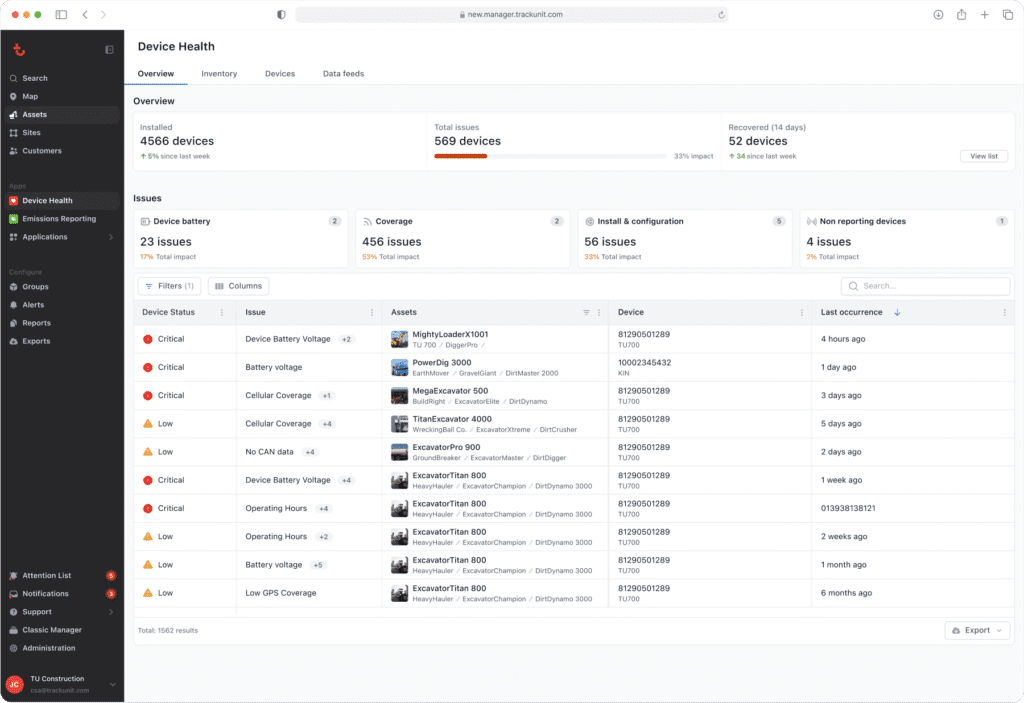
Device Health breaks the problem into four issue categories. Each one has a distinct root cause, a different operational impact, and a different resolution path. Knowing which category an issue falls into is what turns a visibility problem into something you can actually act on.
These are devices that have gone silent. No data in more than two days means no location, no utilization, no insight into what that machine is doing or where it is.
Non-reporting is usually a symptom rather than a root cause, which is why the other three categories matter as much as this one. Understanding what drove a device offline is the difference between fixing the problem and watching it come back.
For a deeper look at why non-reporting devices are more common than most fleet managers expect, and what it costs when they go undetected, see Your fleet has connectivity gaps you don’t know about.
Battery issues come in two forms: an unstable or disconnected external power supply, or a critically low internal battery. Either way, the trajectory is the same. A device running on depleted power will eventually stop reporting. Device Health flags these as critical because the outcome is both predictable and preventable. You just need to be able to see it coming.
Coverage issues split into cellular and GPS. A device operating in an area with no cellular signal cannot send data to the platform. A device with poor GPS signal quality cannot report accurate location even when it is otherwise connected.
These are expected conditions in some environments. What matters is knowing the difference between a device that is genuinely offline and one that is temporarily in a low-signal area. Not every coverage flag requires action. But you cannot make that call if you cannot see it.
These tend to be the quietest and longest-running problems in a fleet. A machine that perpetually reports zero operating hours, or one that appears to run around the clock, usually has an installation issue.
A device physically wired to a machine’s CAN bus but still not capturing CAN data typically has a configuration problem. What makes these particularly hard to catch is that the device looks connected. It is online. Nothing appears broken.
Device Health looks past the surface and detects the patterns that indicate something is still wrong. Device Health shows all four issue types in a single overview, with a table of every affected asset, the issues attached to each one, and a severity indicator so you know what to prioritize.
A fleet-wide view is the foundation. But connectivity problems do not get resolved by whoever has access to the platform. They get resolved by the person at the depot, on the site, or in the service bay who can physically reach the equipment. The gap between those two things is where most fleet connectivity programs stall.
Customers tell us that one of the most valuable things Device Health gives them is the ability to see the full history of what impacted a device’s connectivity. Not just the current state, but the timeline. That changes how you troubleshoot and how you respond when a customer calls.
If a renter tells you a machine was not reporting data during their last job, you can pull up that device, find the relevant timeframe, and show exactly what happened and when it cleared. A timestamped record, not a best guess.
The same filtering logic that makes history useful makes fleet-wide visibility actionable at the right organizational level. If you run a rental operation across multiple depots, the issues at one location are not someone else’s problem to triage from headquarters.
Device Health lets you filter by home depot, so a depot manager sees only what belongs to them. Contractors can filter by construction site. If you are looking for assets sitting at your depot and not on rent, rental status filtering surfaces the equipment that is available to be serviced right now.
The right people seeing the right issues at the right time is not a workflow problem. It is a visibility problem. Device Health solves the visibility side.

Every downstream system that depends on your telematics data, your ERP, your customer reporting portals, your utilization analytics, and the AI-powered Blueprints in IrisX, is only as reliable as the devices feeding it. A fleet with gaps in its connectivity health has gaps in its data, and those gaps compound the further downstream they travel.
Device Health catches connectivity, power, and installation issues early so your data pipelines stay clean and your business systems stay accurate. For teams operating at scale, IrisX extension points make it possible to bring Device Health data into the broader workflows and systems where decisions get made, turning fleet-wide visibility into an accountable, repeatable operational motion.
When every device is reporting correctly, the platform can do what it is designed to do. Device Health is where that starts.
To get started, visit the Device Health getting started guide in the Trackunit Help Center.
Fleet connectivity health refers to how consistently and accurately the telematics devices across your fleet are reporting data. When devices stop reporting, lose GPS signal, or have configuration problems, you lose visibility into the assets those devices are attached to. That affects utilization data, service planning, customer reporting, and any platform capability that depends on telematics input. Monitoring connectivity health gives you a structured way to identify and address those gaps before they affect operations.
The most common causes fall into four categories. A device may stop sending data entirely after more than two days of inactivity. Power issues, including a disconnected external supply or a depleted internal battery, will eventually cause a device to go silent. Coverage gaps, either cellular or GPS, mean a device cannot transmit data even when it is otherwise functioning. Installation and configuration problems, such as incorrect CAN profiles or abnormal operating hour patterns, cause devices to report degraded or inaccurate data without going fully offline.
Device Health assigns a severity indicator to each issue so you can prioritize the problems that have the most operational impact. A lost power supply is flagged as critical because it will eventually cause a complete data gap. Coverage issues in known low-signal areas may be lower priority if they are expected and temporary. The side panel for each affected device shows a description of the issue and the context you need to assess how serious it is for that specific asset.
Yes. Device Health includes filters for home depot, rental status, construction site, asset group, and other asset metadata. This makes it possible to build a view that is relevant to a specific team or location rather than showing the entire fleet at once. A depot manager can see only the devices under their ownership. A site supervisor can see only the equipment on their site. This is how connectivity visibility gets from a central platform view to the people who are accountable for acting on it in the field.
Yes. Each device has a history tab that shows all previously detected issues and when they were resolved. This means you can go back and identify exactly when a connectivity problem occurred, even if it has since cleared. This is particularly useful when a customer reports that a machine was not delivering data during a rental period. You can look up the device, find the relevant timeframe, and show precisely what the device experienced and when it came back online.
Jon Harder is Senior Product Manager at Trackunit, a global SaaS company that connects construction equipment through IoT technology to deliver data-driven insights across the world’s largest construction fleets. He owns the product vision and roadmap for fleet connectivity at Trackunit, including Device Health, the company’s fleet-wide telematics diagnostic product launched in June 2026.