



The first reaction is almost always the same: disbelief. When you show a fleet manager a screen where 15 to 20 percent of their devices have gone silent (not broken, not flagged, just quietly not reporting), the instinct is to question the data.
Then you investigate and start finding real things: subscriptions that lapsed months ago, machines wired incorrectly on a batch install, devices fully disconnected from the machine. That is when the disbelief shifts.
This is the non-reporting problem. It is not a fringe issue that affects poorly managed fleets. It shows up in almost every fleet we work with, and it tends to stay hidden for exactly as long as it takes for something to break downstream.
The harder thing to accept is the timeline. In most cases, the gap between a device going silent and someone noticing is not days. It is months. Devices go quiet, the fleet keeps operating, and nothing raises a flag until a customer calls to say their data is wrong or a CSM runs a periodic health check.
In that window, machines are going out on rent with no telematics data, utilization is not being tracked, and maintenance triggers are not firing. Device Health is about catching it before it reaches that point.
Most fleet managers we talk to already have some version of a connectivity metric. They know their number. The problem is they are stuck at that number. One large rental operation had been measuring their own device health internally and had it sitting at 83 percent. They knew they were at 83 percent. They had been at 83 percent for months. The score gave them nowhere to go.
That is the fundamental limitation of a single aggregate number. It reflects the state of the fleet at a point in time, but connectivity is not a single problem. It is four distinct failure modes, each with a different root cause and a completely different remediation path.
A device that has stopped reporting because its cellular subscription lapsed needs a different fix than one that has lost external power. A device in a coverage gap needs a different response than one wired to a CAN bus but configured against the wrong profile. If you cannot see which problem you are looking at, you cannot fix the right one.
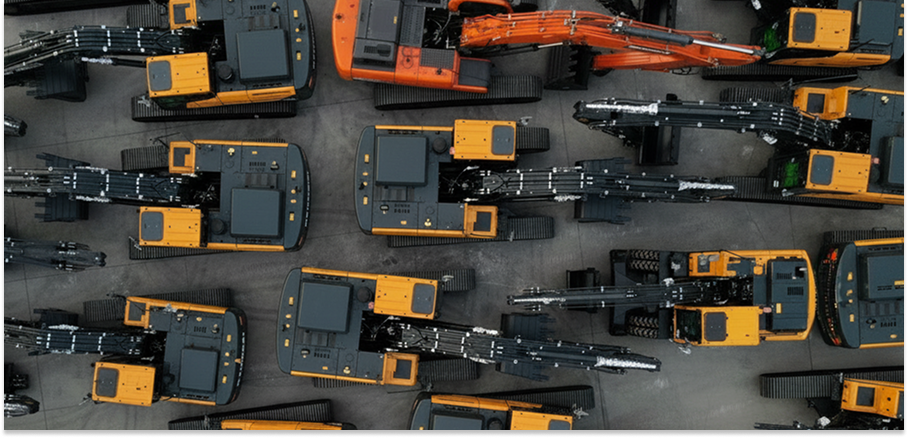
Device Health breaks fleet connectivity issues into four categories: non-reporting devices, battery and power problems, coverage gaps (cellular and GPS), and installation or configuration issues. For every affected asset, it surfaces severity, how long the issue has been present, and the likely root cause. The question changes from “do I have a problem” to “which problem do I fix first, and who should fix it.”
For every non-reporting device, Device Health shows the duration of silence, a severity indicator, and context that points toward likely cause. A device that went quiet after a service visit looks different from one that has been silent for three weeks with no operational explanation. That difference matters when you are deciding how to allocate the time of the people who can physically reach the equipment.
Filters let the right people see the right issues. A depot manager can view only the assets under their depot. A site supervisor can isolate equipment on their site. Connectivity problems do not get resolved at the platform level. They get resolved by the person who can reach the machine, and Device Health closes the distance between those two things.
1. Review your current non-reporting rate: Device Health surfaces this automatically in Trackunit Manager. If you do not have visibility into it today, that is itself a signal.
2. Check how long non-reporting units have been silent: Duration narrows the cause: a long-standing gap points to install, a sudden one to a cause like power or battery.
3. Look for patterns by depot, install batch, or technician: Device Health’s filters make this view immediate. Clustered problems point to a systemic cause. Scattered ones suggest individual device faults.
4. Cross-reference recent service: visits A device that went silent immediately after a scheduled service is a strong indicator of an install or configuration issue introduced at that visit.
5. Check whether your non-reporting rate has been stable or drifting: A number that holds steady month over month can mask a growing tail of devices that have been silent so long they no longer move the aggregate.
Non-reporting is the most visible connectivity problem, but there is a subtler issue that sits beneath it: devices that appear to be reporting but are delivering corrupted data.
One example is what we call “never hours”: an installation failure where the hour meter records zero, or 24 hours continuously, never advancing correctly. The device is online. Data is flowing. But every service schedule built on top of those hours is fiction. The same applies to CAN data: if the CAN bus connection is broken or misconfigured, you are not getting fuel levels, state of charge, or load cycles, even though the device appears healthy.
Device Health surfaces these data quality failures alongside connectivity issues. The positioning is deliberate: you fix the signal layer first, and then everything downstream actually works.
That matters most when you consider what sits above it. Smart Servicing in IrisXderives service intervals from actual operating hours. Out-of-Contract Usage detection identifies machines running beyond agreed terms.
Both depend on a continuous, accurate data stream from every device in the fleet. A non-reporting device is not just a visibility gap. It is a break in the input chain that every downstream capability was built to trust.
The good news is that you do not have to manage this manually. Device Health monitors your fleet automatically. You get the right information to the right person without building your own dashboards or running periodic audits. Getting your fleet’s connectivity health right is not a housekeeping task you do once. It is something Trackunit handles continuously, so the platform can deliver everything it is designed to do.
To get started, visit the Device Health getting started guide in the Trackunit Help Center.
Device Health monitors telematics uptime across your fleet and breaks every issue into one of four categories: non-reporting devices, battery and power problems, coverage gaps, and installation or configuration issues. For every affected asset, it surfaces severity, likely root cause, and a recommended next step, so the question shifts from “do I have a connectivity problem” to “which problem do I fix first.”
Most non-reporting devices stay hidden for so long because fleet connectivity tools surface a single aggregate score. That score reflects the devices that are reporting, not the ones that are not, which means a fleet with a growing number of silent devices can still show a stable connectivity metric. Without a structured view that separates non-reporting into its own category with severity and duration, the problem stays invisible until a customer calls or a subscription cancellation surfaces it as a lagging indicator.
Device Health helps prioritize which connnectivity issues to first by assigning a severity indicator to each issue and shows how long it has been present. A device offline for two days in an unexplained context is a different flag from one that went quiet after a scheduled service visit. Filters for home depot, construction site, rental status, and asset group let you build a view that is relevant to the team who can actually resolve each issue, rather than showing the entire fleet at once.
Fixing non-reporting devices affects what IrisX Blueprints delivers because Smart Servicing derives service intervals from actual operating hours. A device with an installation failure that causes the hour meter to record zero or 24 hours continuously produces a service schedule that is entirely disconnected from reality. Device Health surfaces these data quality failures alongside connectivity issues, ensuring the signals feeding IrisX Blueprints are accurate. A non-reporting or misconfigured device is not just a visibility gap, it is a break in the input chain that every downstream Blueprint depends on.
Jon Harder is Senior Product Manager at Trackunit, a global SaaS company that connects construction equipment through IoT technology to deliver data-driven insights across the world’s largest construction fleets. He owns the product vision and roadmap for fleet connectivity at Trackunit, including Device Health, the company’s fleet-wide telematics diagnostic product launched in June 2026.